Black Friday 2026 Google Ads Checklist for UK E-commerce
Black Friday falls on 27 November this year. Here is the order I would work through tracking, product feeds, budgets and Smart Bidding so the account is ready before the busiest week of the year.
Every year I see the same pattern. The offer is agreed late, the feed is updated on the Thursday night, and the first useful hour of Black Friday is spent fixing a disapproved product or a broken purchase tag. Google Ads rarely fails because of one big mistake. It fails because several small jobs were left until the week that has no slack in it.
I manage paid media across Google, Microsoft and Meta for a UK e-commerce business with a catalogue of more than 2,000 products. This checklist is the order I would work in from now until December. It is written for UK stores on Shopping, Performance Max and Search, but most of it applies to any account.
Black Friday 2026: the key dates
| Date | What it is | Why it matters in Google Ads |
|---|---|---|
| Monday 23 November | Start of Black Week for many UK retailers | Early offers go live and competition for clicks starts rising |
| Friday 27 November | Black Friday | The peak day for most consumer stores |
| Monday 30 November | Cyber Monday | A second peak, often stronger for online-only offers |
| Early to mid December | Last Christmas delivery dates | Delivery promises start to decide conversion rate |
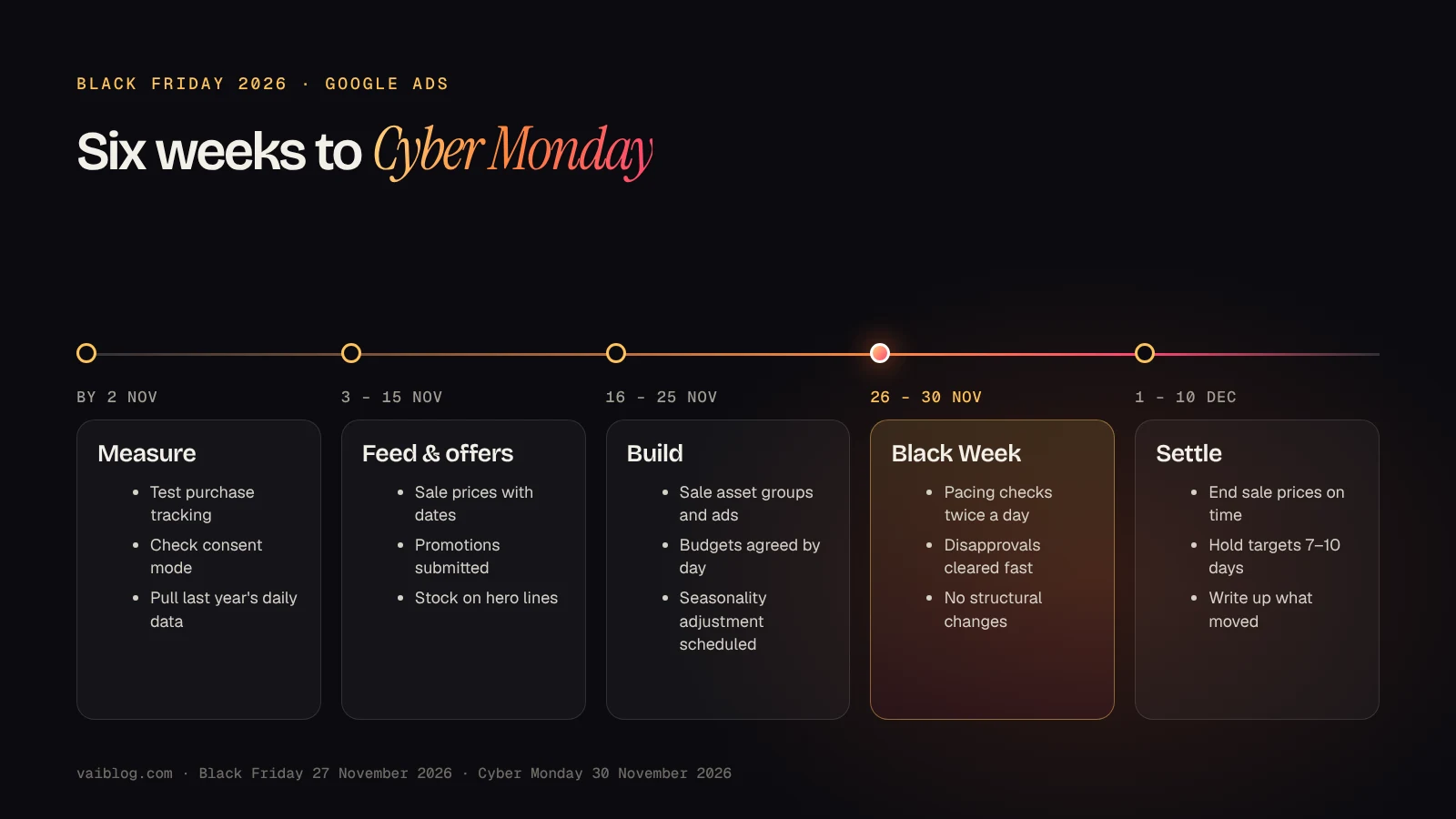
Work backwards from those dates. Anything that needs a review from Google, approval from finance, or a developer should be finished by the middle of November.
1. Prove your conversion tracking first
Smart Bidding can only bid well on the conversions it can see. Before touching budgets, place a real test order on desktop and mobile and confirm three things: the purchase conversion fires once, it carries the correct order value, and the value matches what your shop recorded.
- Check the primary conversion. Make sure purchases are the goal campaigns optimise towards, and that micro-conversions such as add to basket are secondary.
- Check consent. Confirm your cookie banner and consent mode still behave as expected after any theme or plugin changes this year.
- Compare sources. Put last week's Google Ads purchases next to GA4 and your order system. A gap is normal; a sudden new gap is a warning.
If tracking does break during the sale, Google Ads has a tool for it. Data exclusions tell Smart Bidding to ignore the affected period, and Google recommends them for conversion data outages such as tagging errors or website downtime. Know where the setting is before you need it.
2. Get sale prices and stock right in Merchant Center
Most Black Friday problems in Shopping are feed problems. The price in your feed has to match the landing page and the checkout. Google's sale price guidance says to keep submitting the full price in price, add the discounted figure in sale_price, and show both prices on the landing page but only the sale price at checkout.
Use sale_price_effective_date to set when the sale starts and ends, including the time and time zone. Without it, the sale price applies immediately. That small field stops two common mistakes: a discount showing in ads before it is live on the site, and an expired price lingering after the sale.
- Submit any Merchant Center promotions early, so they have time to be reviewed before Black Week.
- Check stock on the products you plan to push hardest. Paying for clicks on an item that sells out on Friday morning is wasted budget.
- Clear existing disapprovals now. My guide to fixing disapproved products covers price mismatches, availability and WooCommerce feed errors.
3. Plan budgets by day, not by month
Pull last year's daily spend, clicks, conversions and revenue from 1 November to 10 December. Look at the shape of the curve rather than the total: which days peaked, where campaigns were limited by budget, and how quickly performance fell after Cyber Monday.
Then agree a daily budget plan with whoever signs off spend. The aim is simple: no high-performing campaign should run out of budget at lunchtime on Black Friday. If the business wants a ceiling, agree it in advance as a daily figure, so nobody has to decide it in a panic.
4. Use seasonality adjustments carefully
A seasonality adjustment tells Smart Bidding that you expect conversion rates to change for a short period, so it can bid ahead of the change instead of reacting to it. According to Google's documentation, they work with Performance Max under any bid strategy, and with Search, Shopping, Demand Gen and Display campaigns that use Target ROAS or Target CPA.
Google describes them as ideal for short events of one to seven days, and warns they may not work as well over more than fourteen days. No negative adjustment is needed when the promotion ends; campaigns return to their usual behaviour.
The hard part is choosing the number. Base it on your own history, not a benchmark: compare last year's conversion rate during the sale days with the weeks before. If your offer and site are similar to last year, Smart Bidding may already expect the peak, and a large adjustment can push bids too high. If the discount is much deeper than usual, or the business is new to Black Friday, an adjustment is more useful. Start conservative, limit it to the sale days, and exclude campaigns such as brand search that should not be affected.
5. Add sale creative without restarting learning
Prepare sale headlines, descriptions and images by mid-November, so they are reviewed and running before the peak. In Performance Max, I prefer adding promotional assets to existing asset groups, or adding one new sale asset group, rather than rebuilding the campaign structure in Black Week. Large structural changes during the busiest days give the system less stable data to work with.
Keep the message specific. "Up to 30% off fixings, order by 1pm for next-day dispatch" says far more than "Huge Black Friday savings". If you are unsure what the latest Google Ads changes mean for testing, I covered them in what to check in September 2026.
6. If you sell B2B, plan for trade buyers
Black Friday is not only a consumer event. Trade customers use it to stock up before the end of the year, but they buy differently. They care about pack quantities, VAT-exclusive pricing, account terms and whether the order arrives before a job starts.
For a B2B catalogue, I would push bulk lines and consumables rather than one-off items, make sure quick ordering still works under load, and state dispatch cutoffs clearly near the price. In my experience, a clear delivery message near the buy button helps a hesitant trade buyer more than an extra five per cent off. I wrote more about that in better ordering and delivery messages.
7. What to watch during Black Week
- Budget pacing, twice a day, against the daily plan.
- Merchant Center diagnostics, for new disapprovals and price mismatches.
- Stock on your top products, and pausing ads on items that have sold out.
- Conversion volume against orders, to catch tracking problems within hours, not days.
- Search terms, adding negatives for irrelevant Black Friday traffic.
Resist the urge to change targets every few hours. Fix what is broken, protect the budget on what is working, and leave the rest alone.
8. After Cyber Monday
Check that every sale price and promotion ended when it should have. Then give Smart Bidding seven to ten days to settle before changing targets based on early December results, because the conversion rate change after a sale is expected.
Finally, write down what happened while it is fresh: daily spend and revenue, which products and campaigns carried the week, where budget ran out, and what broke. That short note is the most valuable input for planning Black Friday 2027.
Common questions
When is Black Friday 2026 in the UK?
Friday 27 November 2026. Cyber Monday is Monday 30 November 2026, and many UK retailers run offers across the whole week from 23 November.
When should I start preparing Google Ads for Black Friday?
Six weeks out is comfortable. Tracking checks and feed fixes should be finished in early November, so promotions and new creative have time to be reviewed.
Should I increase budgets or targets for Black Friday?
Plan budgets by day from last year's data so strong campaigns are not capped. Change ROAS or CPA targets cautiously, and only with a reason based on your own results.
Do I need a seasonality adjustment?
Not always. It helps most when you expect a conversion rate change Smart Bidding cannot predict, such as a much deeper discount than usual, and it works best for short windows of up to a week.